• Post published:
  • Post last modified:

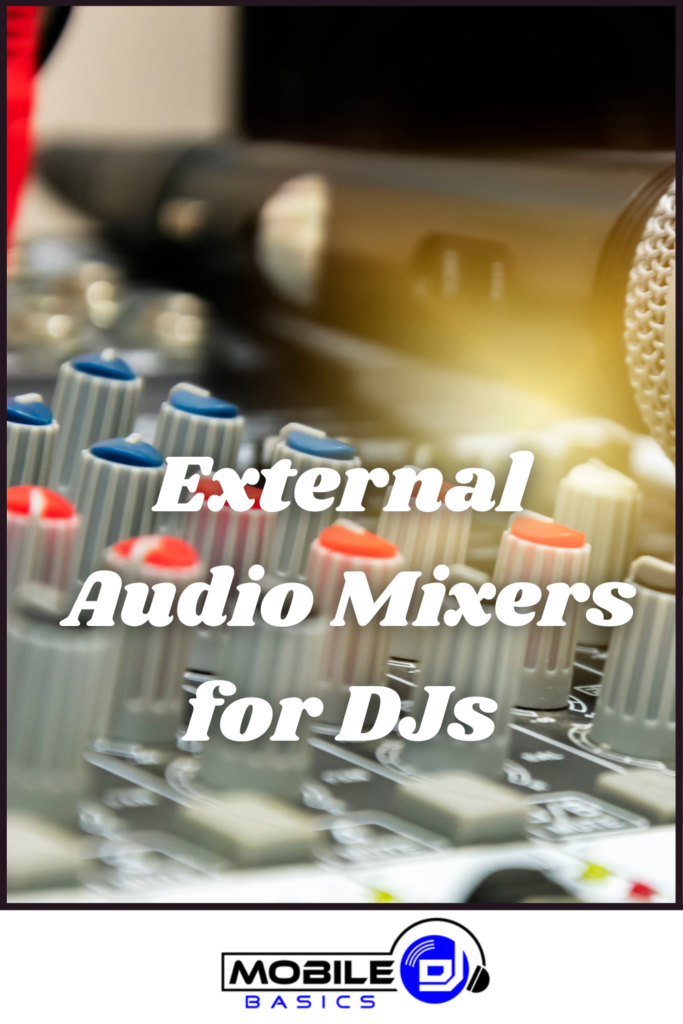
A compact analog audio mixer with mic channels and knobs, the kind a mobile DJ uses as a hub between the DJ rig and the PA

This post may contain affiliate links.
We may earn a commission when you purchase through them.

Audio mixers for DJs are one of the most useful and misunderstood pieces of gear, because the audio mixer is not a replacement for your DJ mixer, it works alongside it. Sitting between your DJ setup and the speakers, a small audio mixer becomes the central hub where your music, your microphones, and any other sources all meet before they hit the room.

Most DJ controllers and mixers have exactly one mic input, if that, and it is usually an afterthought. The moment a wedding has toasts, a corporate event has a presenter, or a ceremony needs two lapel mics, that single input runs out fast. An audio mixer solves that and a lot more.

This article explains when and why you would add one, how it fits into your signal chain, and the two units that do the job well. If you want the plain difference between the two kinds of mixer first, the audio mixer vs DJ mixer breakdown covers that, and the best DJ mixers rundown covers the DJ mixer itself.

TL;DR – Audio Mixers for DJs Quick Facts

  • It works with your DJ mixer, not instead of it. The audio mixer is the hub between your rig and the PA.
  • Microphones are the main reason. Proper mic channels with their own gain, EQ, and reverb beat a single mic input on a controller.
  • One master output to the room. Music, mics, and extra sources all meet in one place with one volume to the speakers.
  • More inputs. Plug in a ceremony music source, a laptop for slideshow audio, or a musician alongside your set.
  • Record the night as a backup, then send it to the client. Capturing the toasts and sending them afterward is a standout professional touch that gets you referrals.
  • Best all-round pick: the Yamaha MG10XU, with clean preamps, built-in effects, and enough channels.
  • Best budget pick: the Behringer Xenyx Q802USB, a compact hub that covers the essentials cheaply.
  • Buy from a real store. Both picks are stocked at Amazon and Sweetwater, a simple filter against junk.


How an Audio Mixer Fits Your DJ Setup

The key idea is the signal chain. Instead of running your DJ controller or mixer straight into the speakers, you run it into the audio mixer first, and the audio mixer feeds the PA. That one change turns a fixed setup into a flexible hub.

The chain looks like this: your DJ controller or mixer plugs into a stereo channel on the audio mixer. Your microphones plug into their own mic channels. Any other source, a phone for ceremony music or a laptop for a slideshow, gets its own channel too. Everything blends inside the audio mixer, and a single master output runs to your speakers.

Now you control the whole event from one place. The music sits at the level you want, you bring a mic up over it for an announcement without touching your DJ software, and you drop it back down when the speech ends. That is the workflow a single mic input on a controller cannot give you.

Tip: Set the DJ Rig to a Fixed Level, Then Mix From the Board

Once your DJ controller or mixer is feeding the audio mixer, set its output to a solid, consistent level and leave it there. Do your event-level volume changes, bringing music down for a toast and back up for the dance floor, on the audio mixer’s channel fader instead. That way your DJ software always outputs the same signal, and the one board in front of you becomes the single place you ride the room’s volume all night.


Why DJs Add an Audio Mixer

Beyond simply having somewhere to plug things in, an audio mixer earns its spot for several real reasons.

Proper Microphone Channels

This is the big one. A dedicated mic channel gives you a real preamp, its own gain, multi-band EQ, and often built-in reverb, so a voice sounds full and clear instead of thin and boxy. Run two or three mics at once, each on its own channel, for a host mic plus speeches, which a controller’s single input simply cannot do.

A True Central Hub

Everything meets in one place. Your music, your mics, a ceremony playlist off a phone, a laptop for video audio, all blend into one master output to the PA. One board, one volume to the room, total control of the whole event’s sound.

Talkover and Clean Announcements

Bringing a mic up over the music is instant on the board, and some mixers add a talkover feature that ducks the music automatically when you speak. Announcements land clean and loud without you diving into DJ software mid-set.

Room to Add Sources

A cocktail-hour music source, a musician sitting in for a song, an extra playback device for backup, they all get a channel. As events get more complex, the audio mixer is what keeps every source manageable in one spot.

A Built-In Backup Path

Because the audio mixer feeds the speakers, it is also your safety net. If your controller or laptop dies mid-event, you can plug a phone straight into a spare channel and keep music playing to the room while you sort out the main rig. That alone has saved plenty of gigs.

Recording the Event

Most of these mixers have a USB output, so you can capture the whole master mix, music, toasts, and all, straight to a laptop. This is worth a section of its own, because it is both your safety net and one of the best marketing moves you can make. More on that below.


What to Look For in an Audio Mixer

For DJ use specifically, a few things matter more than the long feature lists on the box.

  • Enough mic channels. Look for at least two or three proper mic inputs with their own preamps, so you can run a host mic and speeches at once.
  • Clean preamps. The preamp quality is what makes a voice sound professional. This is where a known brand pulls ahead of a no-name box.
  • Built-in effects. A touch of reverb on a mic makes speeches sound polished. Onboard effects save you carrying a separate unit.
  • The right connections. Make sure it has a stereo input for your DJ rig and a balanced main output that reaches your powered speakers cleanly.
  • A USB output. Handy for recording the event or piping in audio from a laptop.
  • Compact and tough. It rides in your bag to every gig, so a small, solid metal box beats a big fragile one.


Record the Event, Then Send It to the Client

This is the benefit most DJs overlook, and it is worth setting up on every event. Because the audio mixer has a USB output carrying the full master mix, you can record the whole night, music, toasts, and announcements, straight to your laptop while you work. It costs you nothing extra once it is wired, and it does two big things.

A Backup Recording, Just in Case

Recording a backup of what is going to the speakers is standard practice in event production for a reason. It captures the audio independently of everything else, so if a moment matters, the first dance, the vows, a key speech, you have it safe no matter what happens with the rest of the setup. Start the recording before doors open and let it run. You will almost never need it, and the one time you do, it is priceless.

Send the Couple or Host the Recordings Afterward

Here is where it turns into marketing. After the event, pull the toasts, the speeches, and the first dance out of the recording and send them to the couple or the host as a thank-you. Almost no one expects it, and for a wedding especially, a clean recording of the best man’s toast or a parent’s speech is the kind of keepsake people treasure. It costs you a few minutes and makes you look like a true professional.

That follow-up is one of the best ways to get talked about after an event. A couple who gets an unexpected recording of their speeches tells their friends, posts about it, and remembers your name when someone asks who to book. It turns a technical habit into referrals, which is exactly the kind of thing that keeps a mobile DJ busy.

Tip: Get Permission and Keep It Clean

Let the couple or host know you record the audio as a backup, so sending it later is a welcome surprise rather than an awkward one. Do a quick level check on the mic channels before the event so speeches record clearly, and trim the clips to just the good moments before you send them. A short, clean recording of the toasts lands far better than a raw two-hour file.


The Best Audio Mixers for DJs

These are two audio mixers that work well as the hub of a DJ rig, at two budgets. Both are stocked at Amazon and Sweetwater, which is a quick quality filter worth applying: a dedicated music retailer carrying gear is a better signal than a no-name listing on a marketplace.

Yamaha MG10XU – Best All-Round Pick

The MG10XU is the one I would put in most DJ rigs. It is a 10-channel mixer with four of Yamaha’s excellent D-PRE mic preamps, so voices sound full and clean, plus one-knob compressors that keep speech levels steady and built-in digital effects for a touch of reverb. It has the stereo inputs to take your DJ rig and extra sources, a balanced main output to your PA, and a USB connection for recording. It is compact, tough, and the sound quality is a clear step up. For a working mobile DJ who handles weddings and events with real mic needs, this is the pick.

Behringer Xenyx Q802USB – Best Budget Pick

If you want the hub without spending much, the Q802USB covers the essentials. It is a compact 8-input mixer with Behringer’s Xenyx mic preamps, per-channel EQ, and a USB output, so you get proper mic channels and a central output for a fraction of the price. It has fewer channels and simpler features than the Yamaha, which is the honest trade, but for a DJ who mainly needs one or two good mic inputs and a place to blend a source or two, it does the job cheaply and reliably.

Mixer Best For Channels Standout
Yamaha MG10XU All-round DJ hub 10, with 4 mic preamps Clean D-PRE preamps, effects, compressors
Behringer Xenyx Q802USB Budget hub 8-input, 2 mic preamps Covers the essentials cheaply

Start with the Yamaha MG10XU if you handle events with real microphone demands and want the cleaner sound, or the Behringer Q802USB if you want a simple, affordable hub for a mic or two.


Setting Up Your Two-Mixer Rig

Wiring the two mixers together is simple once you see the order. Here is the sequence:

  1. Run your DJ rig into the audio mixer. Take the main output of your DJ controller or mixer into a stereo line channel on the audio mixer.
  2. Plug your mics into their own channels. Each microphone gets a dedicated mic channel with its own gain and EQ.
  3. Add any other sources. A phone for ceremony music or a laptop for video audio each gets its own channel.
  4. Run the master output to your speakers. The audio mixer’s main output feeds your powered PA speakers.
  5. Set levels and test. Set the DJ rig to a fixed level, balance the mics against the music, and test every source before doors open.

Once it is wired, the audio mixer is the only thing you touch to ride the room’s volume, which is exactly the point. For the microphones that feed it, the best wireless microphones for DJs and best wired microphones for DJs rundowns cover what to plug in.


Do You Actually Need One

Not every DJ needs a second mixer, so be honest about your events before buying. You probably do not need one if you almost never use a microphone, or if you play sets where the music is the whole show and announcements are rare. In that case your controller’s single mic input is enough.

You will get real value from one if you work weddings, corporate events, or any gig with toasts, presenters, or multiple microphones, if you want cleaner mic sound than your controller gives, or if you like the security of a central hub with a backup path. For the mobile DJ, that covers most events, which is why so many working DJs keep a small mixer in the rig.


Audio Mixers for DJs FAQ

Is an audio mixer the same as a DJ mixer?

No. A DJ mixer is built to blend and transition between music tracks, while an audio mixer is built to combine and shape many sources like microphones and line inputs. For a DJ, the audio mixer works alongside the DJ mixer, not instead of it.

Why would a DJ use an audio mixer with a DJ mixer?

Mainly for microphones and flexibility. An audio mixer adds proper mic channels with their own EQ and effects, lets you blend extra sources, and acts as one central hub with a single master output to the speakers.

How do I connect an audio mixer to my DJ setup?

Run the main output of your DJ controller or mixer into a stereo channel on the audio mixer, plug your mics and other sources into their own channels, then run the audio mixer’s master output to your powered speakers.

How many channels do I need?

For most DJs an 8 to 10 channel mixer is plenty. That covers your DJ rig, two or three microphones, and an extra source or two, with room to spare for a bigger event.

Can I run more than one microphone through it?

Yes, and that is one of the main reasons to have one. Each mic gets its own channel with independent gain and EQ, so you can run a host mic and speeches at the same time, which a controller’s single input cannot do.

Can an audio mixer be a backup if my controller fails?

Yes. Because it feeds the speakers, you can plug a phone or another device straight into a spare channel and keep music playing to the room if your main rig goes down mid-event.

Can I record the event and give it to the client?

Yes, and it is a great professional touch. The USB output records the full master mix, so you can capture the toasts and first dance and send them to the couple or host afterward as a thank-you, which is memorable and helps you get referrals.

Do I need one if I never use a microphone?

Probably not. If your events rarely involve mics or extra sources, your controller or DJ mixer alone is enough. The audio mixer earns its place when you handle toasts, presenters, or several sources at once.


Final Thoughts

An audio mixer is not a replacement for your DJ mixer, it is the hub that sits between your rig and the room. It gives you proper microphone channels, one master output for the whole event, room to add sources, and a backup path if your main setup fails, which is why it belongs in most working mobile DJ rigs.

For most DJs the Yamaha MG10XU is the best all-round choice, with the Behringer Xenyx Q802USB as the budget hub. Match the mixer to the events you actually work, then wire it in as the single place you control the sound.

From here, sort out the microphones that feed it with the best wireless microphones for DJs rundown, and round out the rig with the best DJ speakers that the master output will drive.


Audio mixers for DJs used as a hub for microphones and sources

Subscribe to Our Newsletter


Ryan Conlon

Ryan Conlon is the founder of Mobile DJ Basics. After 18 years running his own mobile DJ company, he shares what actually works - practical guides on gear, bookings, pricing, and performing to help new mobile DJs succeed.