DJ Software has transformed the music industry by putting professional mixing capabilities directly on your computer. Modern DJ applications offer everything from basic beat matching to advanced effects processing, making it easier than ever to create seamless mixes and perform live sets.
Whether you’re just starting out or looking to upgrade your current setup, choosing the right DJ software can make the difference between struggling with your mixes and flowing effortlessly between tracks. The best programs combine intuitive interfaces with powerful features that grow with your skills.
TL;DR
- Serato DJ Pro costs $129 and offers the most reliable performance for club and mobile DJ work.
- Virtual DJ runs on any computer and includes over 100 built-in effects for creative mixing.
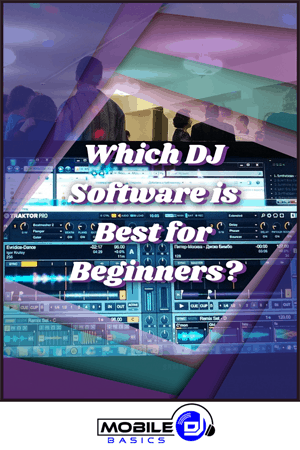
- Traktor Pro 3 provides 4-deck mixing capability and advanced loop controls for electronic music DJs.
- djay Pro AI uses artificial intelligence to separate vocals and instruments in real-time during performance.
DJ Software Fundamentals
DJ software replaces traditional turntables and CD players with digital files and computer control. These programs analyze your music tracks to detect tempo, key, and beat grids automatically, then provide visual waveforms and mixing tools to help you blend songs together smoothly.
Most DJ applications work with DJ controllers that give you physical knobs, faders, and buttons to control the software. This combination of digital convenience and tactile control offers the best of both worlds for modern DJs.
Core Features Every DJ Software Needs
- Beat Sync – Automatically matches the tempo between two tracks for seamless transitions.
- Waveform Display – Visual representation of your music showing beats, breaks, and structure.
- Cue Points – Markers you can set to instantly jump to specific parts of a song.
- Effects – Built-in audio processors like reverb, filter, and delay to enhance your mixes.
- Recording – Ability to capture your DJ sets and save them as audio files.
Professional DJ Software Options
The professional DJ market is dominated by four main platforms, each with distinct strengths and workflows. Your choice depends on your musical style, performance needs, and budget.
Serato DJ Pro
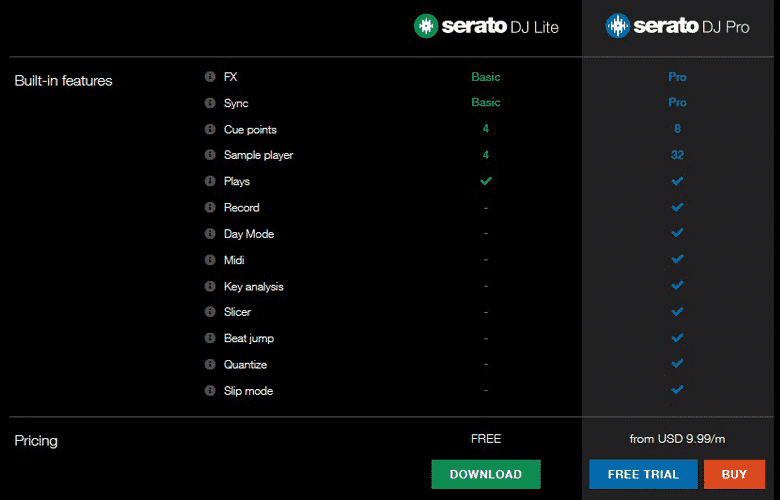
Serato DJ Pro leads the professional market with its rock-solid stability and industry-standard features. The software costs $129 and works seamlessly with most DJ mixers and controllers from major manufacturers.
Club DJs and mobile professionals choose Serato for its reliable performance under pressure and excellent music library management. The software handles large music collections efficiently and rarely crashes during live performances.
Virtual DJ
Virtual DJ offers the most comprehensive feature set at an affordable price point. The home edition is free, while the professional version costs $99 annually or $299 for a lifetime license.
This platform excels in versatility, supporting more audio formats and hardware devices than any competitor. Virtual DJ includes over 100 built-in effects and advanced features like video mixing and karaoke support that appeal to mobile DJs and club performers alike.
Traktor Pro 3
Native Instruments developed Traktor Pro 3 specifically for electronic music and club DJs who need advanced mixing capabilities. The software costs $99 and integrates perfectly with Native Instruments hardware controllers.
Traktor’s standout features include 4-deck mixing, sophisticated loop controls, and remix decks that let you trigger individual song elements like drums or vocals. Electronic music producers and techno DJs particularly appreciate these creative tools.
djay Pro AI
Algoriddim’s djay Pro AI brings artificial intelligence to DJ software with features that seemed impossible just a few years ago. The software costs $49.99 annually and runs on Mac, Windows, iOS, and Android devices.
The AI-powered features include real-time vocal isolation, automatic mixing, and intelligent beat matching that works even with challenging tracks. DJs who work with diverse music styles or need quick setup times find these automated features invaluable.
Start with Free Trials
Download free trials of multiple DJ software programs before purchasing. Spend at least a week with each platform to understand which interface feels most natural for your mixing style.
Budget-Friendly DJ Software
Starting DJs don’t need expensive software to learn proper mixing techniques. Several excellent options cost under $50 or offer capable free versions that provide professional features without the premium price.
Cross DJ Free
Cross DJ Free offers a complete DJ experience at no cost, making it perfect for beginners who want to learn mixing fundamentals. The software includes 2-deck mixing, basic effects, and automatic beat detection.
While the free version has some limitations, it provides enough functionality to develop your skills before upgrading to paid software. Cross DJ works well with entry-level controllers and doesn’t require expensive DJ laptops to run smoothly.
Mixxx
Mixxx stands out as completely open-source DJ software that rivals commercial alternatives in features and performance. This free platform supports 4-deck mixing, advanced effects, and works with over 85 different DJ controllers.
The active development community regularly adds new features and controller support, making Mixxx a legitimate alternative to paid software. Many professional DJs use Mixxx for backup systems or secondary setups.
Mobile DJ Software Solutions
Mobile DJs need software that handles diverse music requests and works reliably with various sound systems. The best mobile DJ platforms emphasize music organization, quick searching, and features that help you respond to crowd requests efficiently.
Integration with DJ speakers and sound equipment becomes crucial for mobile work, as you’ll connect to different venues and systems regularly. Look for software that offers flexible audio routing and works well with external mixers.
Key Features for Mobile DJs
- Music Discovery – Integration with streaming services or large music libraries.
- Request Management – Tools to organize and queue crowd requests efficiently.
- Microphone Support – Built-in controls for announcements and MC work.
- Lighting Control – Integration with DMX lighting systems for complete show control.
- Backup Systems – Automatic playlist saving and emergency backup features.
Hardware Integration
Modern DJ software works best when paired with dedicated hardware controllers that provide tactile control over your mixes. The software you choose should support your existing equipment or influence your next DJ controller purchase.
Most professional controllers come with bundled software that’s specifically designed to work with that hardware. This tight integration often provides the smoothest experience, especially for beginners who want everything to work together immediately.
Controller Compatibility
Check controller compatibility before purchasing any DJ software, as not all combinations work equally well. Some manufacturers design their hardware exclusively for specific software platforms, while others offer broader compatibility.
Pioneer controllers work best with Serato and rekordbox, while Native Instruments hardware integrates perfectly with Traktor. Generic MIDI controllers usually work with any software but may require manual mapping for full functionality.
Frequently Asked Questions
What’s the best DJ software for beginners?
Virtual DJ offers the best combination of features and ease of use for new DJs. The free home edition provides everything needed to learn mixing fundamentals, with upgrade options as skills develop.
Do I need expensive DJ software to sound professional?
No, free options like Mixxx and Cross DJ Free can produce professional-quality mixes. Your mixing skills and music selection matter more than the software price tag for achieving professional results.
Can DJ software work without a controller?
Yes, all DJ software can be controlled using just your computer keyboard and mouse. However, a physical controller makes mixing much easier and more intuitive, especially for live performances.
Which DJ software works best with streaming services?
djay Pro AI offers the most comprehensive streaming integration, supporting Spotify, Tidal, and SoundCloud directly within the software. This eliminates the need to download tracks before mixing.
How much storage space does DJ software need?
The software itself typically requires 1-5 GB of storage space. However, your music library will need much more – plan for at least 100 GB of storage for a decent collection of high-quality audio files.
Final Thoughts
DJ Software has evolved into sophisticated platforms that rival traditional hardware setups in both capability and reliability. Whether you choose a premium option like Serato DJ Pro or start with free alternatives like Mixxx, the key is finding software that matches your mixing style and performance needs.
Download free trials and spend time with different platforms before making your final decision. The right DJ software will feel intuitive from day one and provide room to grow as your skills develop.
Subscribe to Our Newsletter
From discovering new songs to getting more gigs, I’m excited to share the wealth of knowledge I’ve gained through many years of DJing. [email protected]